
See how much an Airbnb listing is estimated to earn
Research a property you’re considering buying, investigate a competitor or review a potential comparable listing.
See estimated revenue, occupancy and average daily rate (ADR) together. Understand whether the property’s income comes from higher nightly prices, more booked nights or a combination of both.
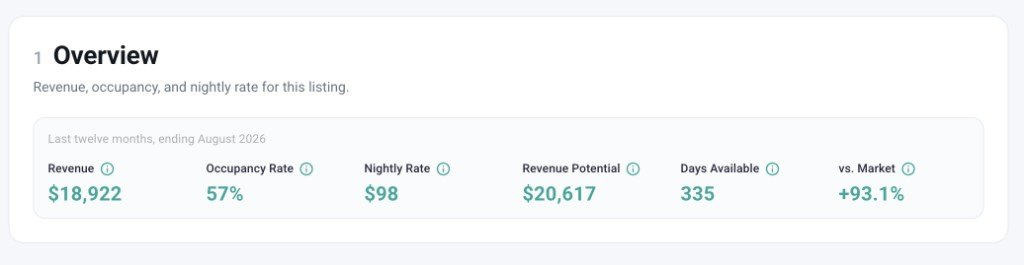
Review monthly revenue, occupancy and nightly rates
An annual revenue figure can hide a short peak season or several quiet months.
Explore up to three years of monthly performance, where available. Compare busy and quiet periods, review changes between years and see how consistently the listing has performed. The available history depends on how long Airbtics has tracked the property.
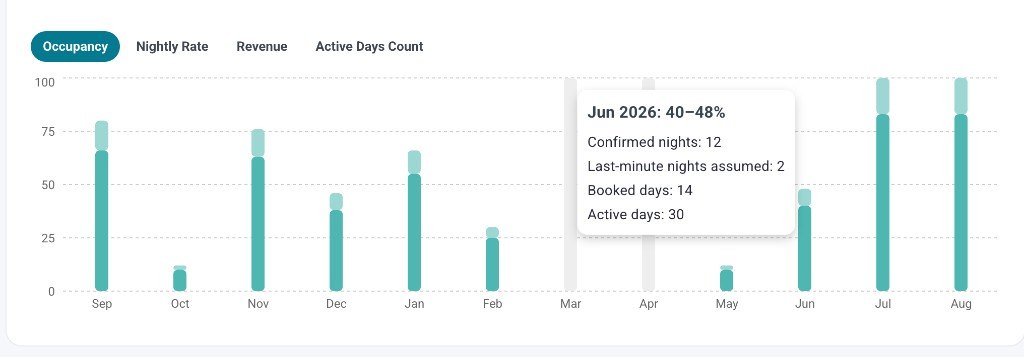
Inspect the listing-level data behind the estimate
Open historical calendar snapshots to see which nights were available or unavailable when Airbtics checked the listing, along with the prices recorded on available nights.
Review this evidence alongside the monthly figures to assess whether the property is a useful benchmark. An unavailable night can represent a reservation or a date blocked by the host; the snapshots record what was visible when we checked.
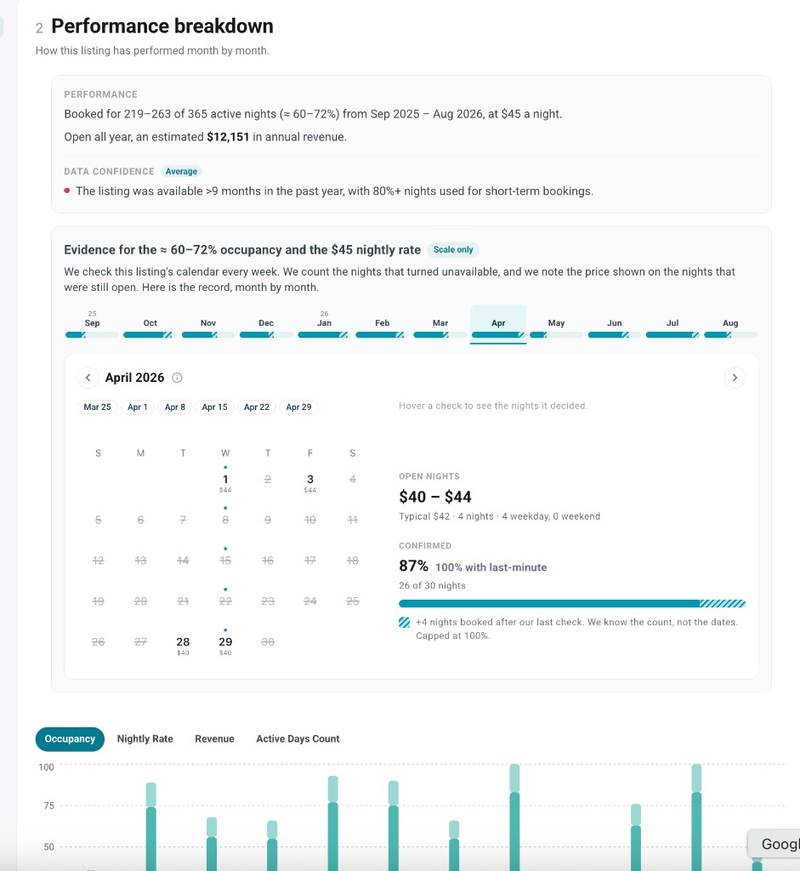
Put the listing’s performance in context
Review the property’s location, bedroom count, amenities and availability before using its revenue as a benchmark.
A larger home with a pool may serve a different audience from a nearby apartment. A property offered for only part of the year may also need a different comparison from one operated year-round.
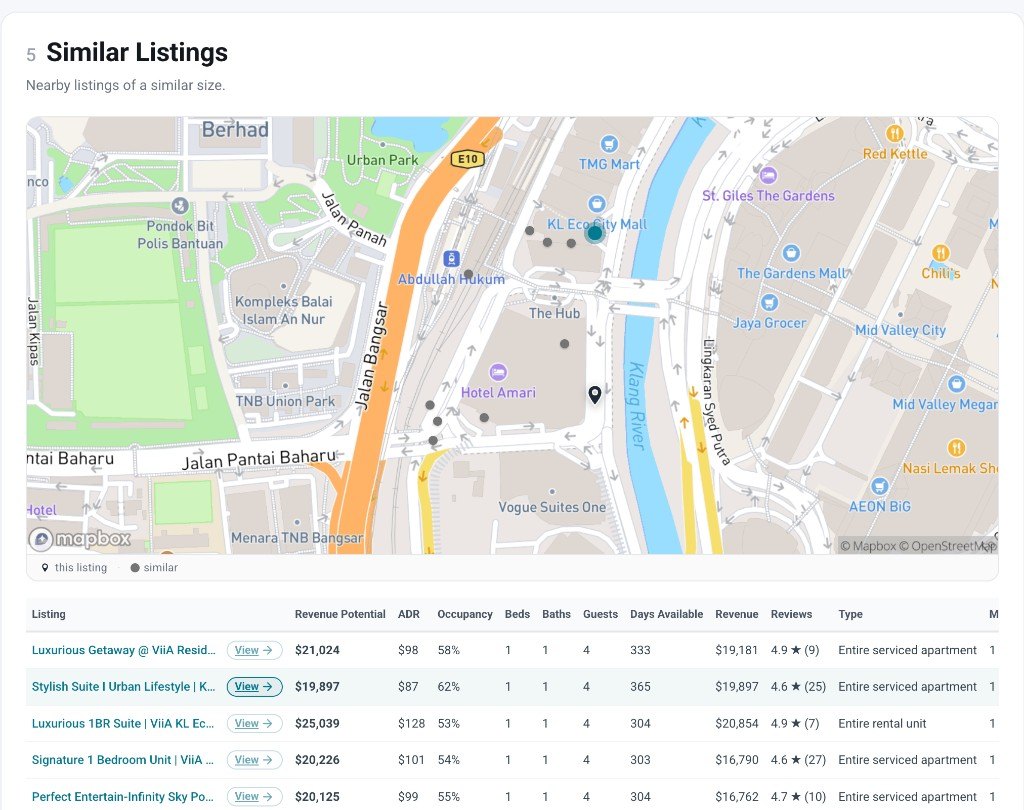
Explore similar properties in the market to build a more relevant picture of earning potential.
How to find your Airbnb listing ID
The Airbnb listing ID is the number immediately after /rooms/ in a standard listing URL.
For example, in https://www.airbnb.com/rooms/12345678, the listing number is 12345678.
- Open the property’s full listing page on Airbnb in your browser.
- Find the number after
/rooms/in the address bar. - Copy that number or the full listing URL into the search box above.
Pasting the full listing URL is usually the easiest option.
Frequently asked questions
How do I find a specific Airbnb listing?
If you have its listing number, enter it after https://www.airbnb.com/rooms/ in your browser to open the property on Airbnb. To research its estimated revenue and historical performance, enter the same number or full listing URL in the Airbtics lookup above.
If you don’t have the number or link, ask the host to share the listing URL, or narrow your Airbnb search using the location and property details you know.
Can I search using an Airbnb property ID?
For this lookup, Airbnb property ID means the listing ID found after /rooms/ in the property’s URL. Enter that number or paste the full listing URL. A host profile ID, reservation confirmation code or local rental registration number identifies something different.
Are the revenue figures the host’s actual earnings?
The figures are Airbtics estimates, rather than the host’s private Airbnb earnings statements or payouts. Use them to research historical performance and compare properties. Revenue also differs from profit, which depends on operating costs and financing.
How much historical data can I see?
Monthly revenue, occupancy and ADR history is available for up to three years, depending on the data available for the listing. Calendar-snapshot coverage is shown separately and may cover a shorter period.
Why can’t I find a listing?
Check that you entered the property’s full listing URL or the number after /rooms/. If you have a shortened share link, open it in a browser and copy the full listing URL. Data availability varies, and some listings may have limited history or may not be tracked by Airbtics.
What if I only have a property address?
Use the Airbnb income calculator to estimate potential revenue for an address. This listing number search is for researching properties that already have an Airbnb listing.
Ready to research a listing?
Paste its Airbnb URL or listing number into the search box above.
Look up listing