
Airbtics Market Overview
Airbnb market analysis for your next investment
Understand how much short-term rentals earn in your chosen market, which neighbourhoods perform best, and what kind of property could work for you.
Airbtics brings market trends, local comparisons and individual listing data into one dashboard, so you can assess the opportunity before committing to a property.
Analyze a market See what’s in the dashboardAssess your Airbnb investment with Market Grade
High rental revenue is only one part of an investment decision. Property prices, demand and the direction of the market matter too.
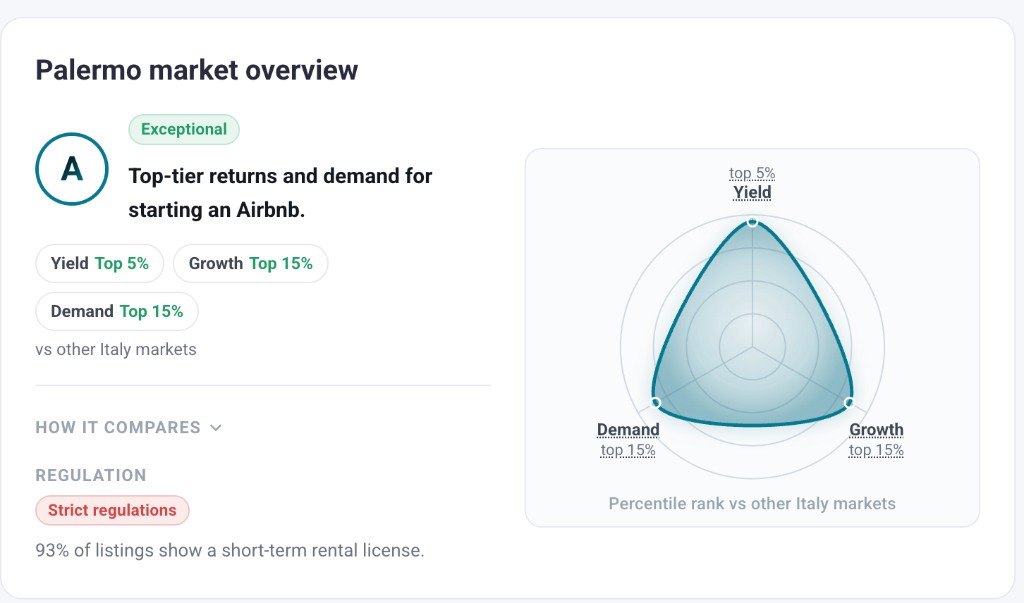
Market Grade brings together three measures and shows how your chosen market compares with others in the same country:
- Rental yield: estimated annual rental revenue relative to property price.
- Growth: how rental revenue is changing year over year.
- Demand: how often short-term rentals are occupied.
Use the grade to understand a market’s strengths and trade-offs before looking more closely at locations and properties. If you are still choosing a location, compare Airbnb investment markets worldwide to build your shortlist.
See how the market has changed over three years
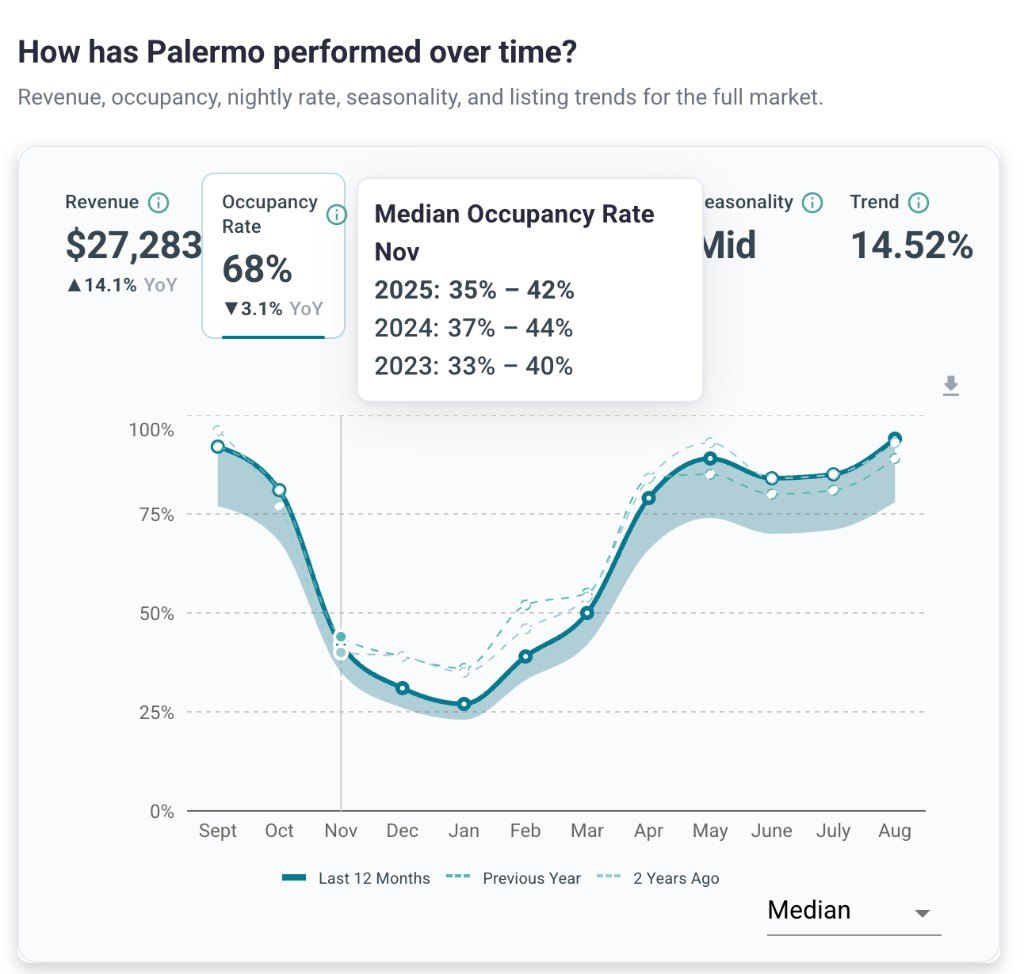
An annual revenue figure can hide a busy summer, a quiet winter or a recent slowdown. Review up to three years of monthly revenue, occupancy, average daily rate (ADR) and active listings to see the pattern behind the headline numbers.
Compare the same months across years to understand seasonality and spot changes in performance. Follow the number of active listings alongside revenue and occupancy to assess whether growing competition is putting pressure on the market. You can also compare Airbnb occupancy rates across locations for a broader benchmark.
Find the best areas for Airbnb in your chosen market
A citywide average is a starting point. Properties near the beach, in the centre or in a quieter residential area can perform very differently.
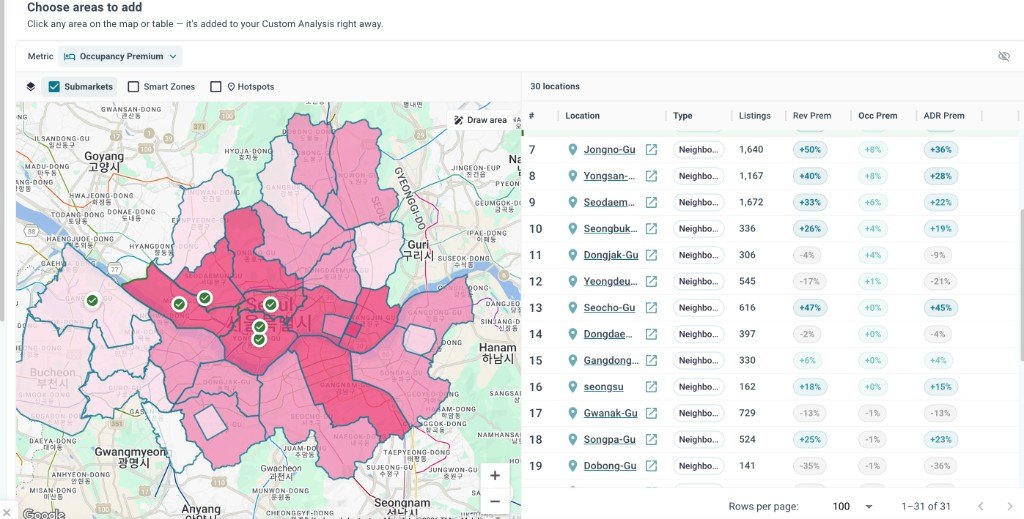
Use heatmaps to compare revenue, occupancy and nightly rates across neighbourhoods. Explore hotspots to investigate areas of interest, then narrow your research to the locations that matter to your plans. For an example of location-specific research, explore our guide to the best areas for Airbnb in New York.
You can also define your own area. Save the area currently shown on the map or draw a boundary around the streets you want to investigate. Compare that selection with other areas within the market to see how performance differs.
Find the best type of property for Airbnb
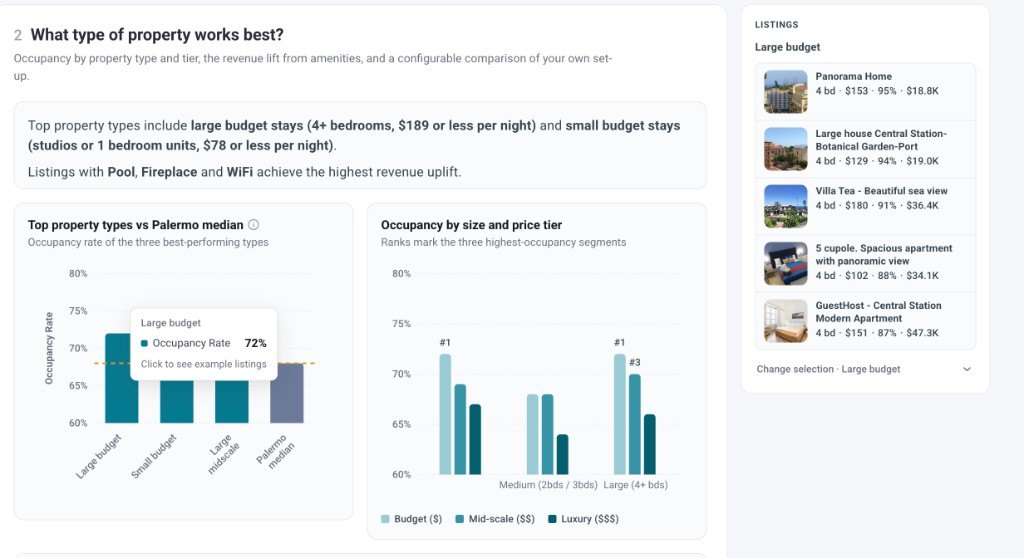
Once you have a location in mind, compare the property setups that work there. Explore performance by bedroom count, property type and price range to decide what you want to buy, rent or operate.
Choose the best number of bedrooms for Airbnb
Compare revenue, occupancy and nightly rates across bedroom counts in your chosen area. See whether larger homes earn enough additional revenue to warrant the extra space and cost, or whether a smaller property better fits your budget. Our guide to the best number of bedrooms for Airbnb explores these trade-offs across different markets.
Compare property types and price ranges
Explore how apartments perform against houses, or compare budget stays with higher-priced properties. Looking at occupancy alongside nightly rates and revenue helps you understand which segments attract bookings and how much they earn. Read our guide to the best type of property for Airbnb for examples of how the choice varies by market.
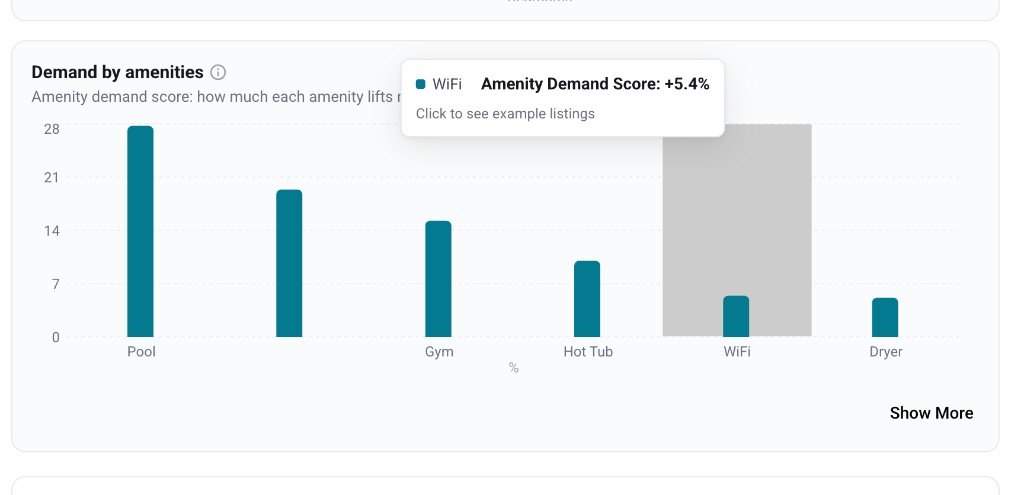
Assess the value of amenities
Considering a pool or hot tub? Compare similar properties with and without the amenity to assess whether the observed revenue premium could justify the additional cost. Keep the location, size and quality of the properties as similar as possible when making that comparison.
Understand when guests are visiting
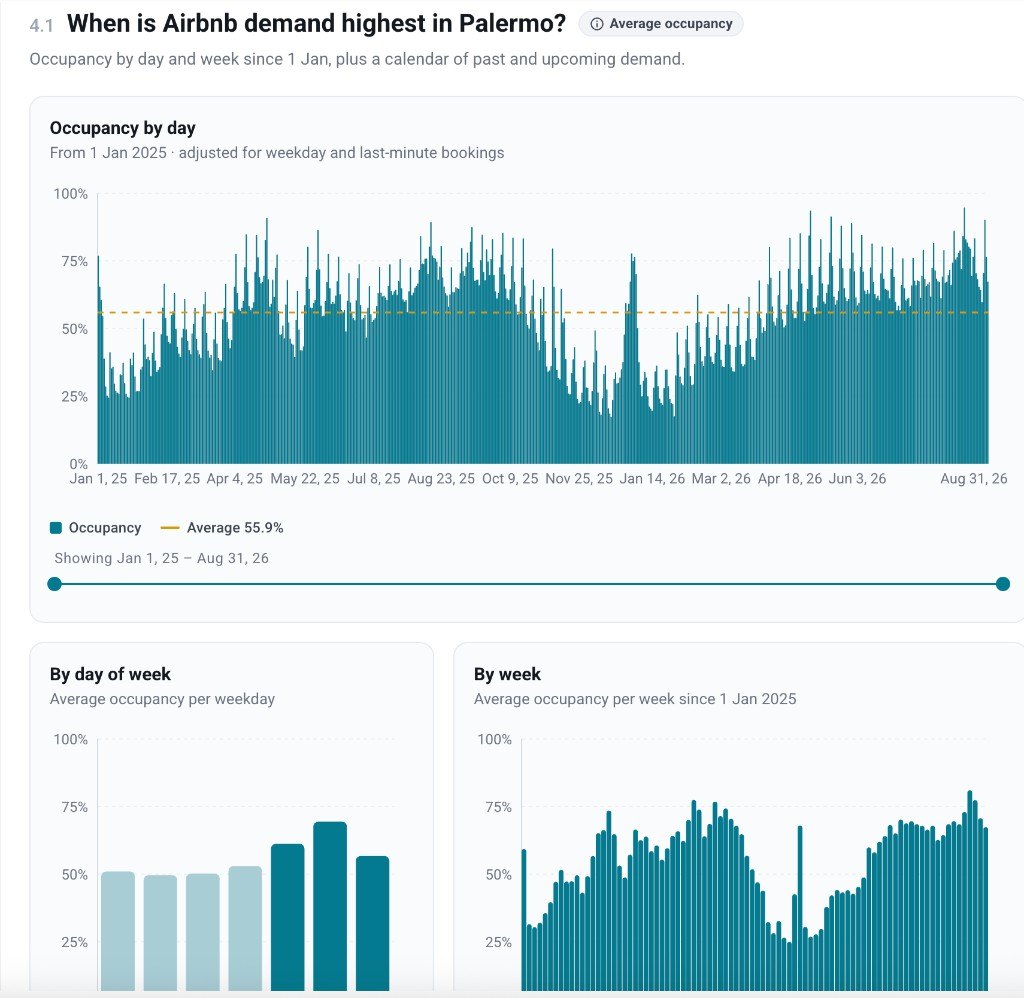
See how demand differs between weekdays and weekends, and explore daily patterns to identify particularly busy dates.
Daily demand spikes can help you investigate the effect of local events and holidays. Look at those dates alongside broader seasonal patterns to judge whether demand is spread throughout the year or concentrated in a few periods.
Use that context when planning your availability and revenue expectations.
Explore tourism statistics for your Airbnb market
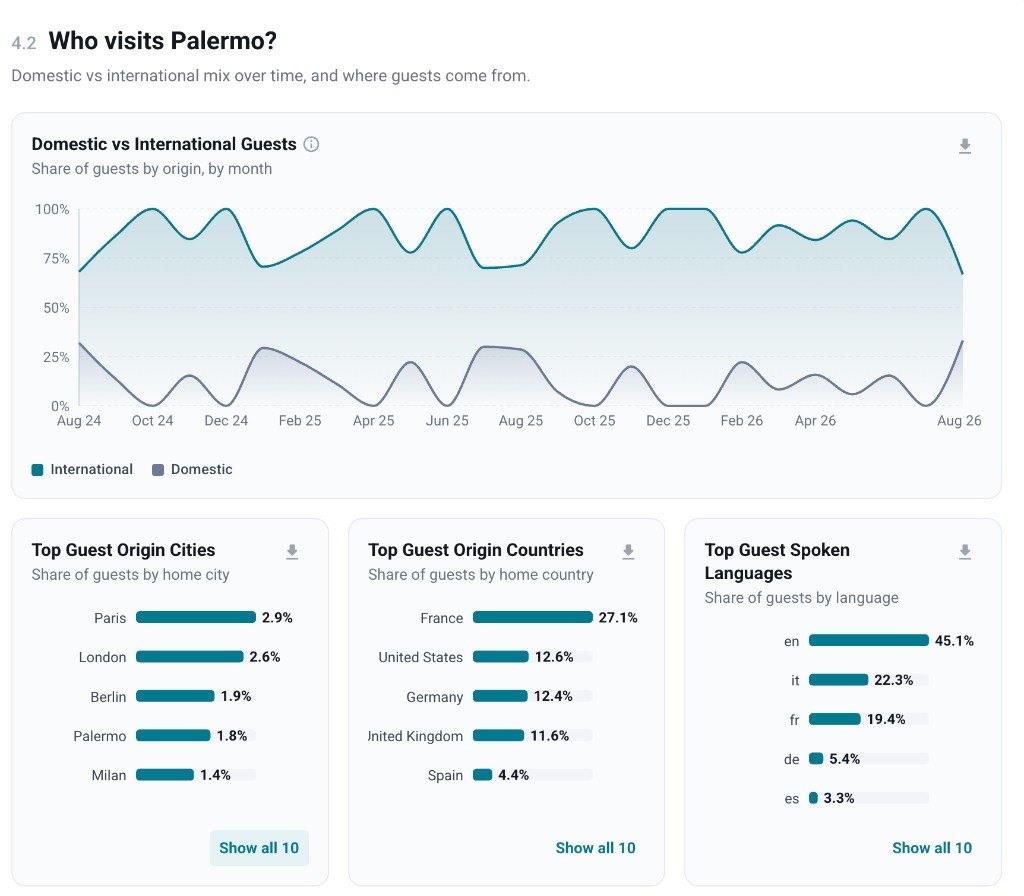
Explore short-term rental guest origins to understand the mix of domestic and international visitors, along with the leading countries and cities they travel from.
Use these tourism statistics to understand the audience you could be hosting. Guest origins can inform your listing languages, arrival information and local recommendations, helping you prepare a stay that suits your visitors.
See the listings behind the market figures
Market statistics summarize the performance of individual properties. With Airbtics, you can investigate those properties and decide how relevant they are to your plans.
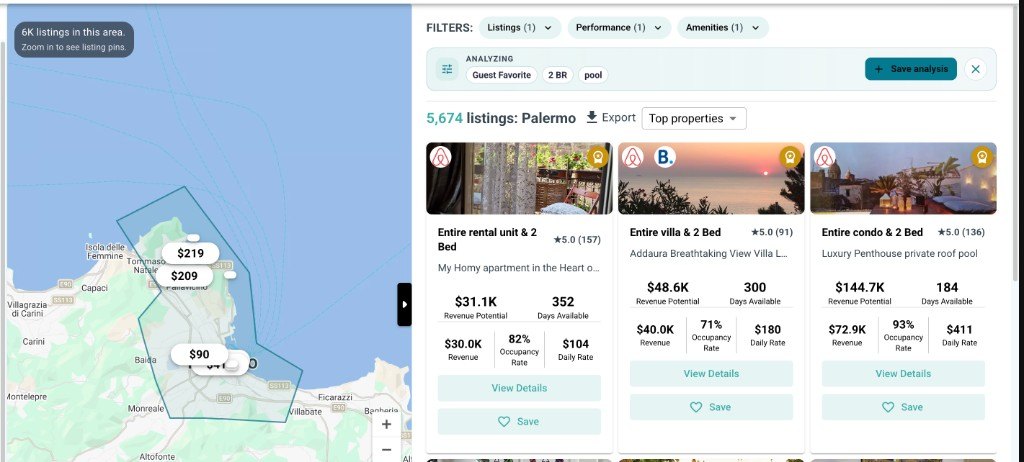
Find relevant listings on the map
Browse the listings map and apply filters to focus on the properties you want to investigate. Open a listing to review its details and performance, rather than relying only on the market average.
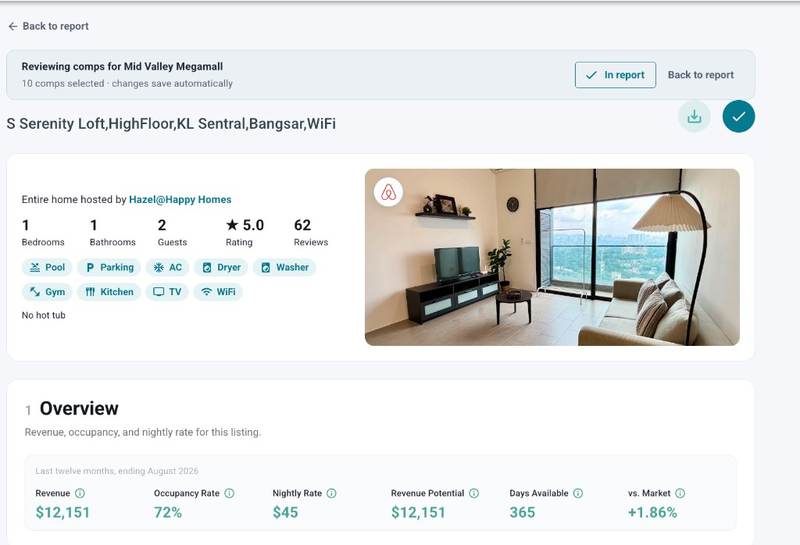
Review monthly performance for each listing
See up to three years of estimated monthly revenue, occupancy and nightly rates for an individual listing. Investigate how its performance changes through the seasons and how it compares with the wider market. If you have an address in mind, use our calculator to estimate income for a specific property.
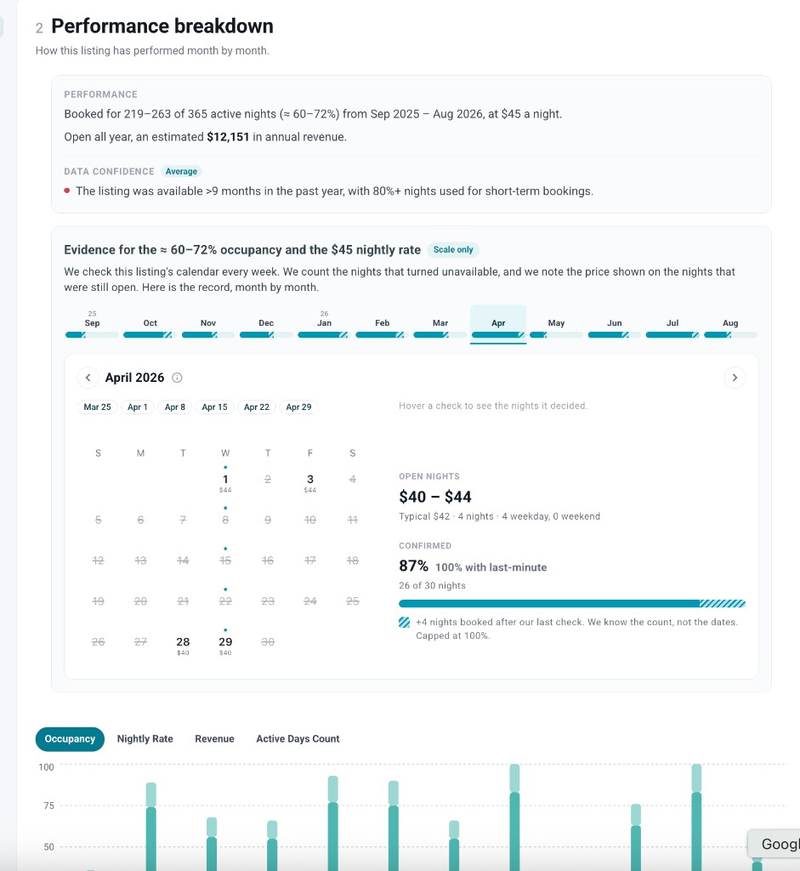
Inspect the calendar observations behind the estimates
Review calendar snapshots from the last 12 months to see which nights were available or unavailable when Airbtics checked, along with the prices recorded for available nights.
An unavailable night can reflect a booking or an owner block. The snapshots give you a record of the observed calendar, so you can inspect the evidence alongside the estimated performance.
Historical coverage varies by listing.
Frequently asked questions
Can I research an Airbnb market before buying a property?
Yes. You can assess rental yield, revenue growth and occupancy, then compare neighbourhoods and property types before choosing a property. Use the findings to build an income projection, alongside your purchase or rental costs and expected operating expenses.
Can I analyse a specific neighbourhood instead of the whole city?
Yes. Use location heatmaps, submarkets and hotspots to compare areas within a market. You can also draw your own boundary or save the area shown on the map, then compare revenue, occupancy and nightly rates within that selection. Available location layers vary by market.
How can I find the best number of bedrooms for an Airbnb?
Compare revenue, occupancy and nightly rates across bedroom counts in your chosen market or neighbourhood. This helps you see which property sizes attract bookings and generate more income. Consider the additional purchase, furnishing and running costs of a larger property when deciding which setup works best for you.
Can I compare properties with amenities such as a pool or hot tub?
Yes. Filter listings by amenities and compare their performance with other properties in the same area. For a useful comparison, keep location, bedroom count and property type as similar as possible. A revenue difference shows how those groups performed; it does not guarantee the same increase from adding an amenity to your property.
Can I see when demand is strongest and whether the market is becoming saturated?
Yes. Review up to three years of monthly revenue, occupancy, nightly rates and active listings to understand seasonal patterns and market trends. Comparing supply growth with occupancy and revenue helps you assess whether competition is increasing alongside demand or putting pressure on performance.
Can I check the individual listings behind the market figures?
Yes. You can browse individual listings and inspect their historical revenue, occupancy and nightly rates. Listing-level calendar snapshots let you review the observed availability and prices behind the estimates, helping you assess whether the properties are relevant to your research.
Does an unavailable Airbnb night always mean it was booked?
No. A night can be unavailable because of a booking, an owner block or another restriction. Airbtics uses calendar observations and estimation methods to assess performance. Calendar snapshots show what was observed, but an unavailable date alone does not confirm a paid booking.
How much historical data can I see?
The market dashboard provides up to three years of historical performance, depending on coverage. Individual listing histories and calendar snapshots can cover different periods. If you need a particular listing or date range, check its available history before relying on it for your research.
Is estimated revenue the profit I would take home?
No. Estimated revenue is an input into your profitability calculation. You still need to account for expenses such as rent or financing, management, utilities, maintenance, insurance and applicable taxes. Your result will also depend on your property’s availability, pricing and operation.
Take a closer look at your chosen market
Compare its performance, investigate neighbourhoods and property types, and review the individual listings behind the numbers.
Analyze a market