
Best Airbnb Calculator in 2026: We Tested 4 Tools on Properties We Own
The best Airbnb calculator should do more than give you an annual revenue estimate. It should help you understand which properties support that number, whether they compete with yours, and how much confidence to place in the result.
I own Airbnbs in Seoul and Kuala Lumpur, so I compared Airbtics, AirDNA, BNBCalc and AirROI against the occupancy and nightly rates I use as benchmarks for those properties.
Airbtics produced the closest annualized revenue estimate in both examples: 0.4% above my Seoul benchmark and 3.3% below my Kuala Lumpur benchmark. AirDNA was also close in Kuala Lumpur, at 6.9% below the benchmark. These are results from two properties, not proof that one calculator will be most accurate everywhere.
This comparison focuses on calculators with international coverage. Rabbu, Awning, Chalet and Mashvisor are discussed separately, but were not included in the Seoul and Kuala Lumpur tests.
Disclosure: I’m Jae An, founder of Airbtics. This comparison uses my own properties and owner benchmarks. I’ve included the inputs, calculation method and shareable Airbtics reports so you can inspect the results yourself.
Which Airbnb calculator performed best in our test?
For these two properties, Airbtics was closest to the owner benchmarks, while AirDNA was a close second in Kuala Lumpur. BNBCalc and AirROI produced lower estimates in both locations.
The choice also depends on what you want to do with the estimate. Airbtics offers a workflow for examining location adjustments and listing-level evidence. AirDNA provides customizable comps and a Comp Set Strength indicator. BNBCalc combines revenue estimates with financial models for buying, arbitrage, an already-owned property and cohosting. AirROI offers an internationally available revenue calculator, although I could not reconcile its specific occupancy estimates with my knowledge of these two properties.
The most useful comparison is therefore both numerical and practical: How close is the estimate, and can you explain why it is reasonable?
How does an Airbnb calculator estimate revenue?
An Airbnb calculator estimates potential rental income using the performance of other short-term rentals, usually taking location, property size and comparable listings into account.
The basic revenue relationship is:
Annual accommodation revenue = average daily rate × occupancy rate × available nights
For example, a property averaging $90 per booked night at 65% occupancy over 365 available nights would generate approximately $21,353 a year in accommodation revenue.
That is revenue before operating costs, not profit. In the calculations below, cleaning charges, taxes and other additional fees are excluded; platform fees and operating expenses have not been deducted.
The more difficult question is how a calculator chooses the nightly rate and occupancy assumptions. Here are the approaches behind the tools we compared.
Comparable listings as the starting point
AirDNA, BNBCalc and Airbtics support workflows based on comparable properties, often called comps. These are nearby listings with characteristics similar to the property you want to analyze, particularly bedroom count and property type.
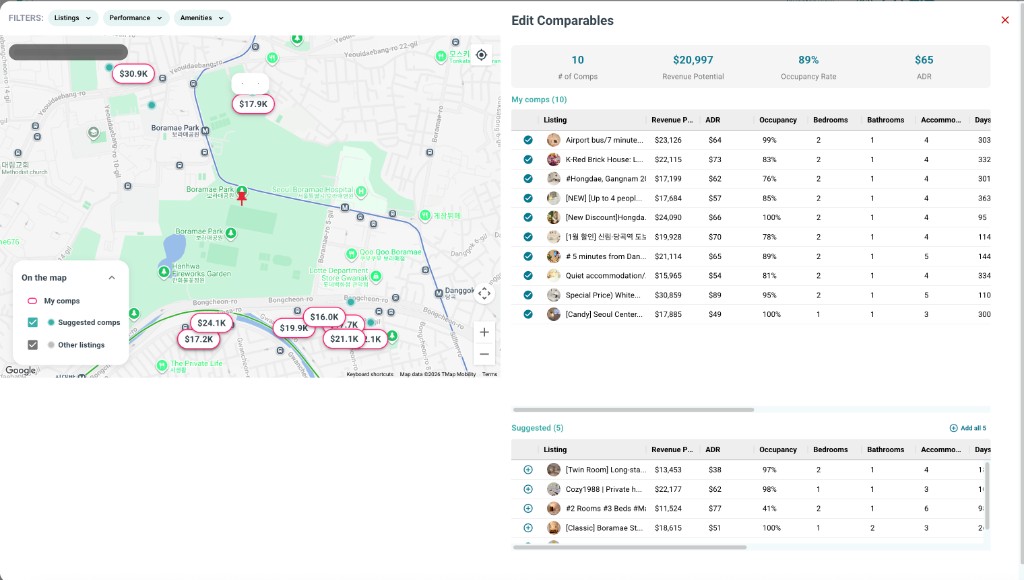
You enter an address and property details, review the suggested listings, and assess whether they are relevant. Where the tool supports it, you can refine the comp set or adjust your assumptions.
The estimate is not necessarily the median revenue of those listings. AirDNA describes a relevance-weighted approach, where more similar properties receive more weight, alongside adjustments for broader market conditions. BNBCalc also emphasizes comparable listings as part of its property analysis.
Comp selection matters because two properties with the same bedroom count can attract very different guests. A renovated apartment beside a business district may perform differently from an older apartment a kilometre away.
Market baseline plus neighbourhood and property adjustments
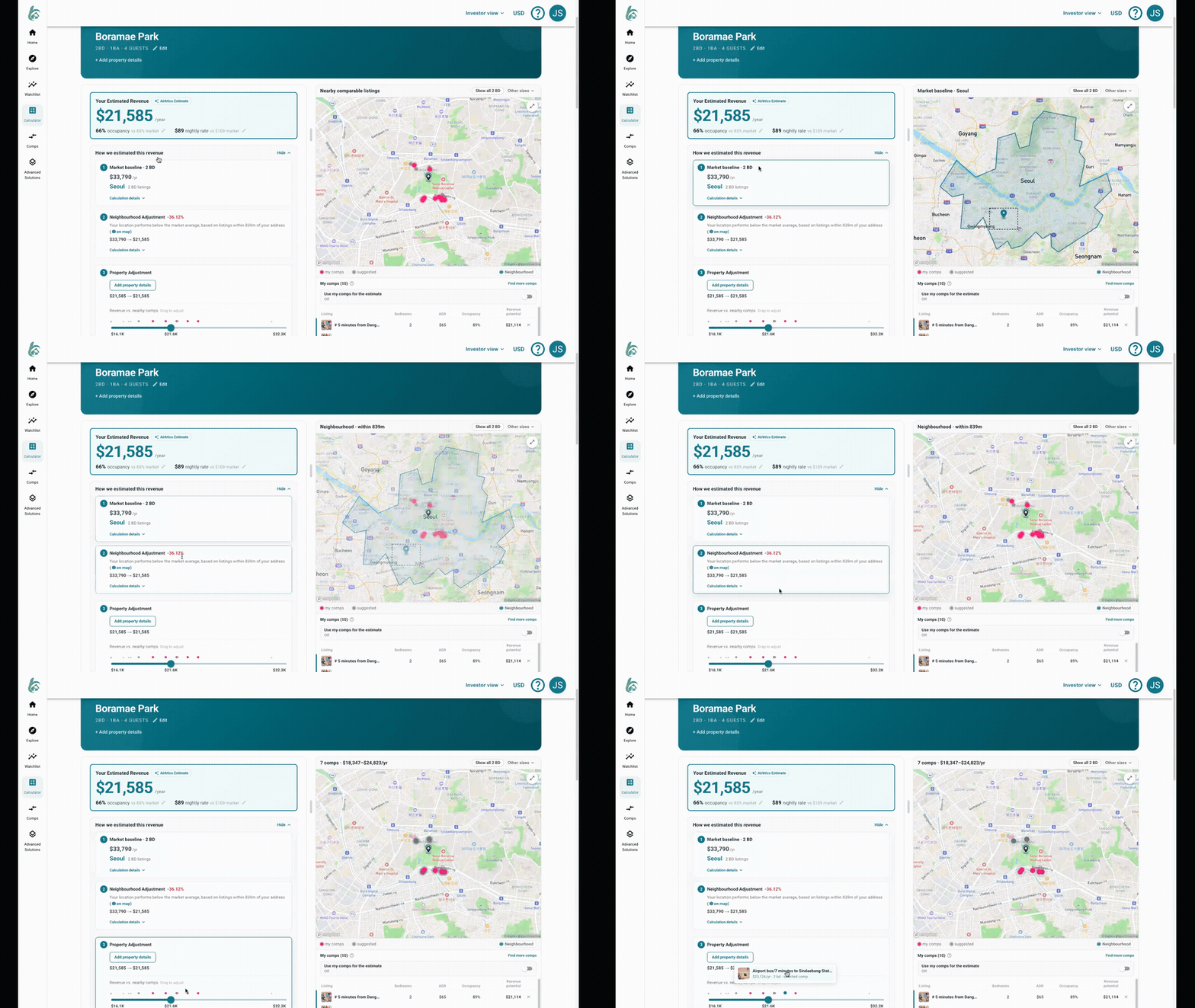
Airbtics also offers an estimate that starts with market performance, then accounts for the neighbourhood and the property's characteristics.
The market baseline provides a starting revenue level. The location adjustment considers how listings in a smaller local cluster perform relative to that benchmark. The property adjustment then considers how the specific home compares with relevant listings.
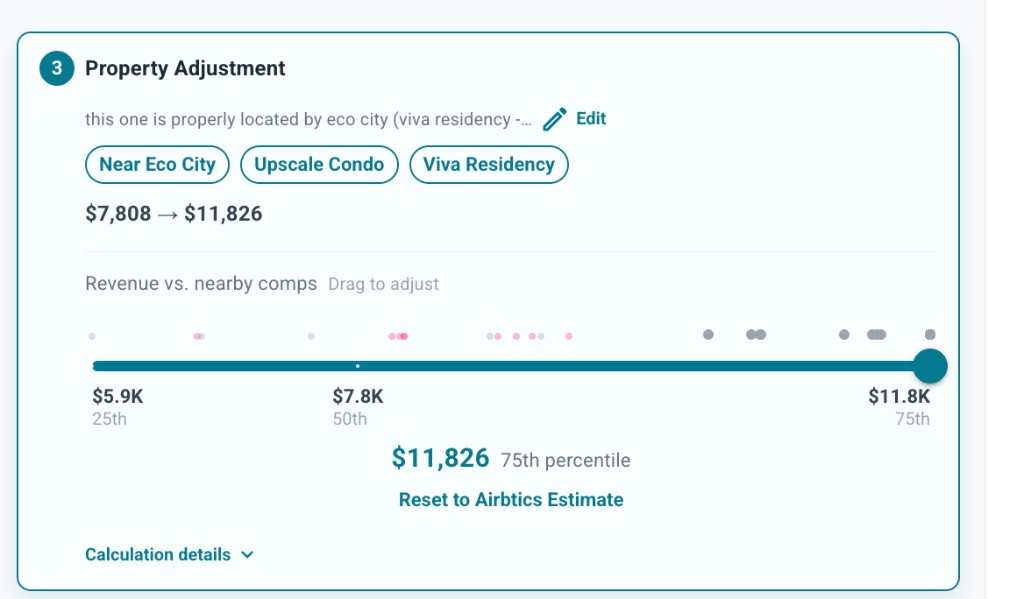
You can describe features such as a good view, a large terrace or a heated pool. Airbtics uses AI to interpret those details alongside comparable listings and recommend a performance percentile. That recommendation is an assumption to review, rather than a guarantee that a particular amenity will produce a fixed revenue increase.
This is useful when bedroom count alone does not capture what makes a property different.
A published method does not always explain a specific result
AirROI says its calculator uses comparable listings and machine-learning models, incorporating factors such as seasonality and amenities. Its general methodology is therefore described publicly.
However, in my Seoul test, I could not determine why the calculator recommended 40% occupancy. The difficulty was explaining that particular result against my property benchmark, rather than an absence of any published methodology.
That distinction matters when choosing a calculator: knowing the broad method is helpful, but being able to inspect an individual estimate is more useful.
To apply this to your own property, enter an address into the Airbtics Airbnb income calculator and review the comparable listings behind your estimate.
Airbnb calculator comparison results for Seoul and Kuala Lumpur
I tested two different situations: a two-bedroom Seoul property serving short stays and weekend guests, and a one-bedroom Kuala Lumpur property with a stronger emphasis on mid-term stays.
To compare the outputs consistently, I converted every supplied occupancy and average daily rate figure into annual accommodation revenue using 365 available nights. These are standardized calculations, not necessarily the annual revenue totals displayed by each vendor, which may use different availability or seasonal assumptions.
The benchmarks below reflect my operating expectations for the properties. They are not presented as audited trailing-12-month earnings.
The results in one table
All monetary figures are in US dollars. Differences are calculated before rounding; “pp” means percentage points. Revenue differences compare each tool with the owner benchmark for that city.
| Property | Calculator or benchmark | Occupancy | Nightly rate | Annualized revenue | Revenue difference | Difference % |
|---|---|---|---|---|---|---|
| Seoul | Owner benchmark | 65% | $90 | $21,353 | — | — |
| Seoul | Airbtics | 66% | $89 | $21,440 | +$88 | +0.4% |
| Seoul | AirDNA | 71% | $61 | $15,808 | −$5,544 | −26.0% |
| Seoul | BNBCalc | 66% | $65 | $15,659 | −$5,694 | −26.7% |
| Seoul | AirROI | 40% | $52 | $7,592 | −$13,761 | −64.4% |
| Kuala Lumpur | Owner benchmark | 55% | $65 | $13,049 | — | — |
| Kuala Lumpur | Airbtics | 54% | $64 | $12,614 | −$434 | −3.3% |
| Kuala Lumpur | AirDNA | 52% | $64 | $12,147 | −$902 | −6.9% |
| Kuala Lumpur | BNBCalc | 42% | $47 | $7,205 | −$5,844 | −44.8% |
| Kuala Lumpur | AirROI | 39% | $44 | $6,263 | −$6,785 | −52.0% |
Test 1 — A two-bedroom Airbnb near Boramae Park in Seoul
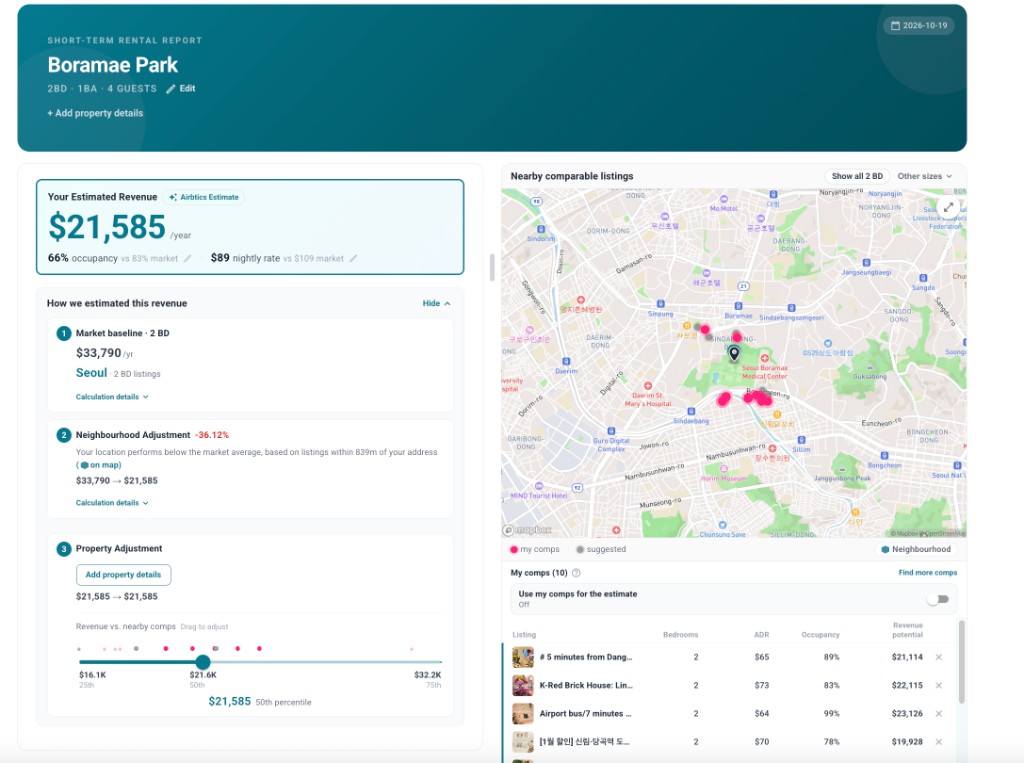
The Seoul property is an entire unit with two bedrooms, one bathroom and capacity for four guests, near Boramae Park. The test location is approximately 37.493280, 126.920520.
You can view the property on Airbnb and open the Airbtics Seoul estimate.
For this property, I consider two operating scenarios reasonable: 75% occupancy at $80 a night, or 65% occupancy at $90 a night. They imply annual accommodation revenue of approximately $21,900 and $21,353, respectively. I used the second scenario as the table benchmark, rather than combining the higher rate with the higher occupancy.
Airbtics returned 66% occupancy and an $89 nightly rate, close to the second scenario. AirDNA and BNBCalc returned occupancy estimates within or close to my expected range, but substantially lower nightly rates. AirROI returned lower estimates for both metrics.
This illustrates why you should inspect occupancy and nightly rate separately. An estimate can have a plausible occupancy assumption and still understate revenue because its rate assumption is too low for the property.
Test 2 — A one-bedroom property near Mid Valley in Kuala Lumpur
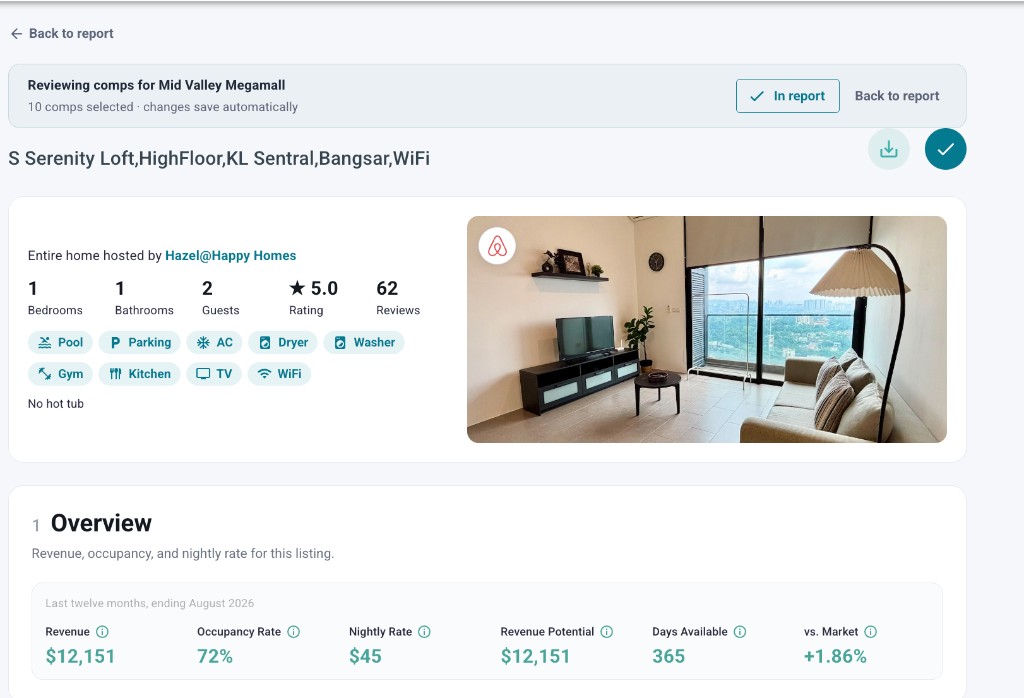
The Kuala Lumpur test is a one-bedroom property near Mid Valley, at approximately 3.118056, 101.676666. My benchmark is 55% occupancy at $65 per night, with a heavy emphasis on mid-term stays.
This is the more challenging location. In my assessment, only around five properties are close matches in the immediate area. Properties roughly a kilometre away can have significantly lower nightly rates and occupancy.
Airbtics returned 54% occupancy at $64 per night. AirDNA was also close, at 52% occupancy and $64. BNBCalc and AirROI returned lower estimates for both occupancy and nightly rate.
I cannot establish from the outputs alone why each estimate differed. But the example shows why it is worth reviewing the map and comp set in detail: a wider search area may introduce properties serving a different guest market.
Open the Airbtics Mid Valley estimate to inspect the report.
What these results can and cannot tell us
Airbtics was closest to my benchmarks in this small comparison. That is useful evidence for these two cases, but it does not establish an overall accuracy rate for any provider.
Results can change with the address pin, selected comps, property description, available nights, reporting period and manual adjustments. The Kuala Lumpur property's mid-term strategy also makes it important to consider length-of-stay discounts and whether the comps follow a similar strategy.
Use these examples as a model for testing a calculator against properties you understand, rather than assuming the same ranking will hold in every market.
What else should you look for in the best Airbnb calculator?
Financial calculations that match how you operate
A revenue estimate is the starting point. The next calculation depends on whether you are buying a property, renting it for arbitrage, operating a home you already own or managing it for someone else.
| Your situation | Inputs to look for | What you need to understand |
|---|---|---|
| Buying a property | Purchase price, startup costs, financing and operating expenses | Whether projected income supports the investment |
| Rental arbitrage | Monthly rent, setup costs and operating expenses | Whether enough income remains after rent and other costs |
| Already own the property | Available nights, owner stays and operating expenses | Expected income under your actual availability |
| Property management | Management fee, owner-use nights and payout assumptions | Your management revenue and the owner's expected payout |
In the workflows reviewed for this comparison, Airbtics supports these different operating perspectives, including owner-use and payout assumptions. BNBCalc explicitly lists buy, rental arbitrage, owned and cohost models.
Check the actual inputs in your chosen plan. A calculator that lets you enter a purchase price may still need additional work to model a rental-arbitrage deal or a property-management agreement properly. Likewise, a product's investment-oriented interface does not establish that the wider platform lacks other capabilities.
Listing-level evidence you can inspect
All four tools showed annual revenue, occupancy and ADR for comparable properties in the workflows reviewed. Those figures help you compare listings, but the next question is how they were estimated.
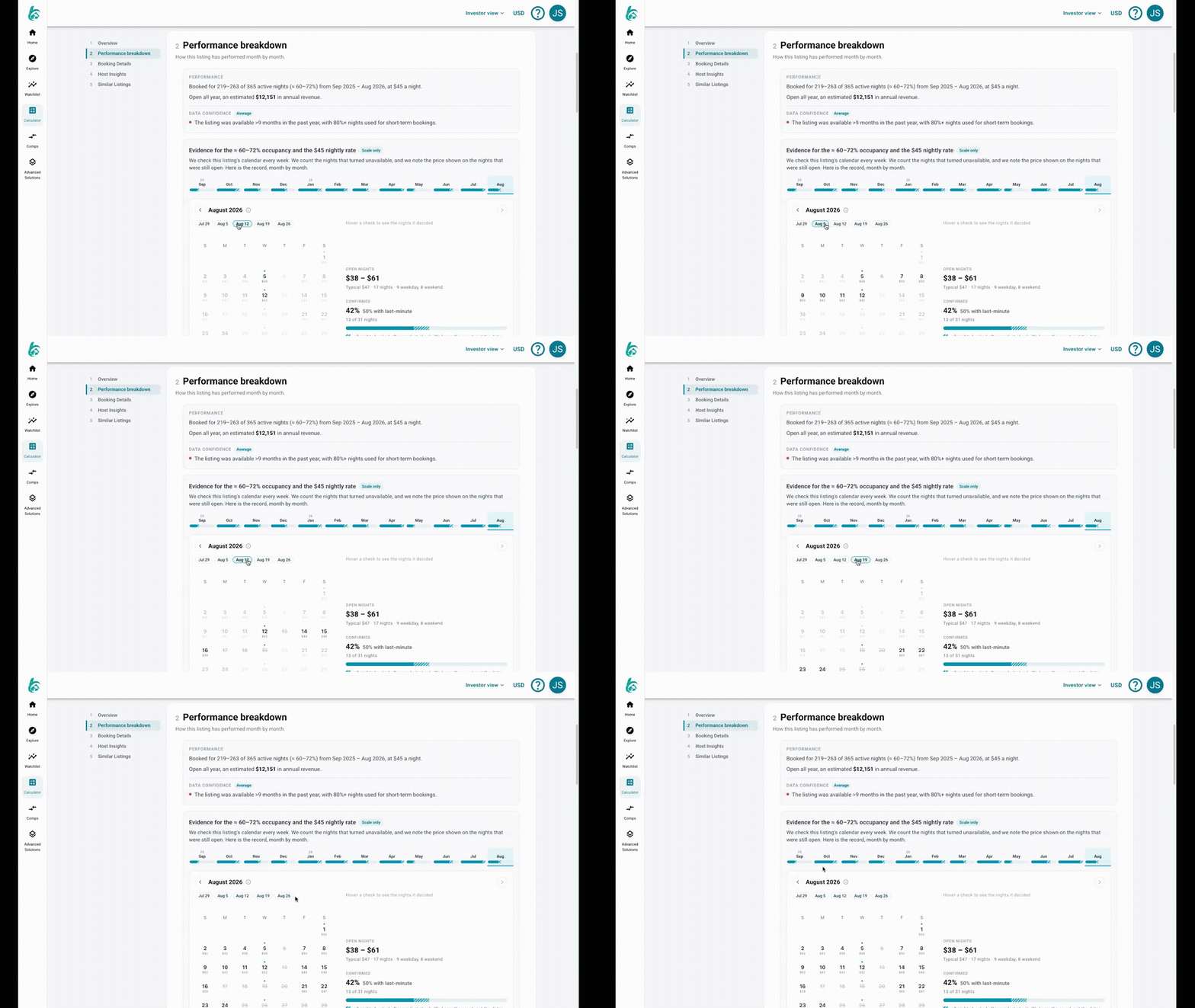
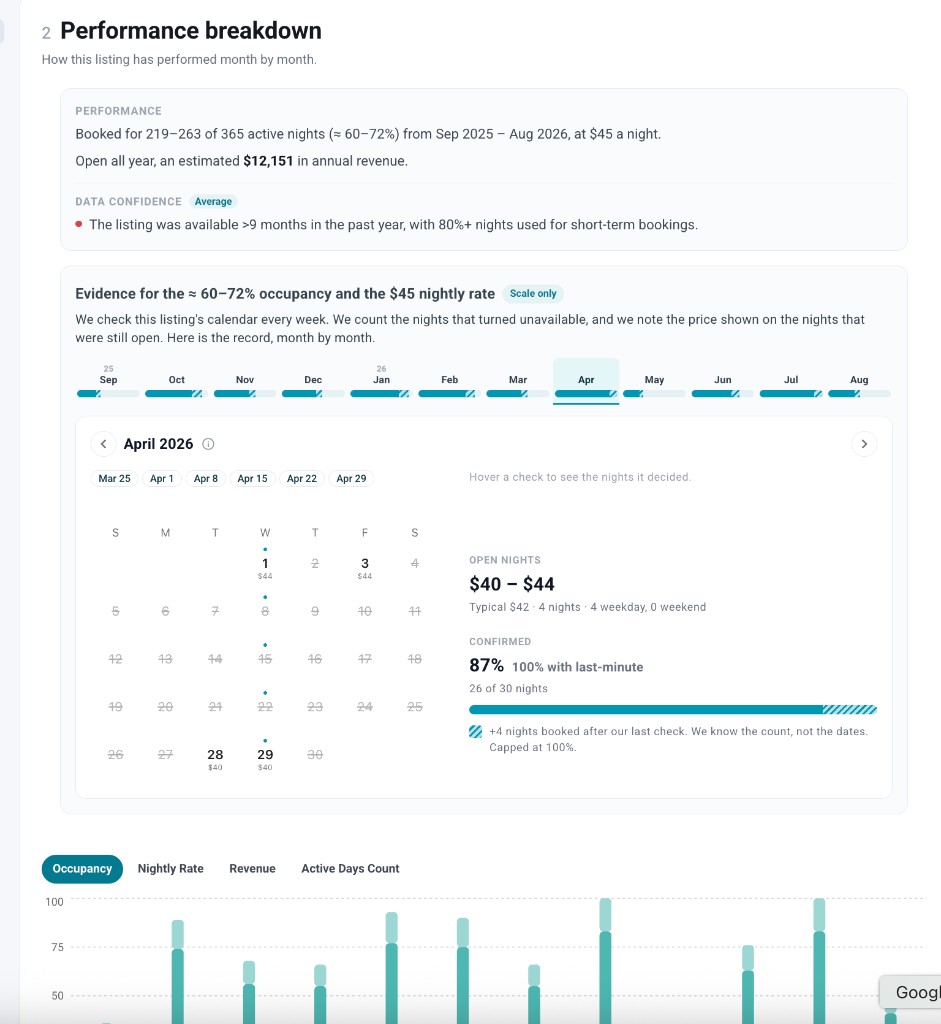
Airbtics lets you go further into individual listings: review monthly revenue, occupancy and ADR, then inspect historical calendar snapshots collected through weekly checks.
This makes it easier to investigate an unusual number. Was the listing active throughout the year? Was performance concentrated in a short peak season? What prices were visible when the calendar was checked?
Calendar evidence still requires interpretation. An unavailable night may reflect a reservation or an owner block, and a visible calendar price is not necessarily the final price paid by a guest. Historical snapshots make the evidence more inspectable; they do not turn estimated revenue into a verified payout statement.
For me, this ability to examine the evidence is one of Airbtics' strongest advantages. I want to understand a comp before using its performance to estimate my own property's income.
Shareable reports and visible assumptions
An estimate becomes more useful when another person can review it. If you are discussing a property with a partner, investor or owner, share the assumptions and comparable listings alongside the headline revenue figure.
The Airbtics reports linked above let readers inspect the examples used in this article. Record the capture date too: a live report may change as the underlying data is updated.
What about Rabbu, Awning, Chalet and Mashvisor?
These are additional names to consider when researching US rental properties, but they were outside this article's international test scope.
- Rabbu combines Airbnb revenue research with a marketplace for short-term rental properties.
- Awning is another Airbnb estimator to check for a US property analysis.
- Chalet combines short-term rental research with an agent-oriented buying and selling service.
- Mashvisor offers rental-property analysis and Airbnb data for investors researching US markets.
We did not score these tools against the Seoul and Kuala Lumpur benchmarks. Their omission is not an assessment of their accuracy, and you should check current address coverage before choosing any calculator.
Frequently asked questions about Airbnb calculators
-
What is the best Airbnb calculator for international properties?
Airbtics, AirDNA, BNBCalc and AirROI are options for estimating revenue outside the United States. Airbtics was closest to the owner benchmarks in our two-property comparison, but the best choice for your address depends on relevant local comps, the assumptions you can adjust and the evidence available to inspect.
-
How accurate are Airbnb calculators?
Accuracy varies by property and location. A calculator may struggle when there are few relevant comps, sharp differences between nearby neighbourhoods or an unusual operating strategy. Check the underlying listings and compare occupancy and nightly rates separately. Two property examples cannot establish a platform-wide accuracy percentage.
-
How do I calculate Airbnb revenue from occupancy and nightly rate?
Multiply average daily rate by occupancy and available nights. At a $90 ADR, 65% occupancy and 365 available nights, annual accommodation revenue is approximately $21,353. Use the number of nights you actually plan to offer if the property will not be available year-round.
-
Does an Airbnb calculator estimate revenue or profit?
The headline estimate usually refers to revenue. Profit requires deducting costs such as rent, utilities, maintenance, management and platform fees. Financing affects cash flow too. Check which expenses are included before comparing a calculator's profit or return figures.
-
Why do different Airbnb calculators give different estimates?
Tools can select different comparable properties, weight them differently, use different reporting periods or make different assumptions about availability and seasonality. Small differences in occupancy and nightly rate compound when converted into annual revenue.
-
Can an Airbnb calculator account for a pool, view or terrace?
Some tools allow amenity filters, comp selection or property-specific adjustments. In Airbtics, you can describe property features to help inform a recommended performance percentile. Review the supporting comps rather than assuming an amenity always creates the same revenue premium.
Choose a calculator you can question
For my Seoul and Kuala Lumpur properties, Airbtics produced the closest estimates to my owner benchmarks. AirDNA also performed well in the Kuala Lumpur example.
The more lasting lesson is to look beyond the headline number. Check the location, review the comps, understand the occupancy and rate assumptions, and inspect the evidence behind any listing that materially affects your estimate.
Start with the Seoul example or the Kuala Lumpur example to see what that review looks like in practice.
Ready to check your own property? Estimate your Airbnb income, then review the location, comps and assumptions behind the result.